Gerard's codebase

This is a personal repository of code snippets and information.

Over the years I have generated lots of little sub programs and stored away acres of useful code snippets. The problem is always to locate them.

Even more time wasting is forgetting how to do simple things when you havnt developed in an environment for a few years (or even a few months)

My new years resolution is to start putting them up in a common place as I produce them. (thanks google)

They are handy for me and, with a bit of a clean up and documentation, they might be handy for others if they wander in here.

Gerard 2008

Tuesday, March 31, 2015

SSRS Troubleshooting notes for Data connection Errors

Datasets unable to refresh fields

  The size necessary to buffer the XML content exceeded the buffer quota

  This often occurs when building a report based on a previous report
  Often it is because you are referencing fields that are not in the existing data scope,
  You are probably referencing a dataset or fields that have not been included in the report yet

  An item with the same key has already been added.

      Duplicate field names in your SQL


  Must declare the scalar variable "xx". (when this Parameter already exists)

      1) Add the Parameters Manually in the Parameters Tab of the Dataset Properties
    
      2) Report xml is scrambled - Multiple reasons can cause this but I had a big problem with this occurring when I was converting crystal reports to SSRS and using an online conversion tool to do the basics (and set up all the positioning and formatting as per the original which some of these tools are very good at)

      I have never put the time and effort into working out what the problem was. Instead I have opened a fresh report and quickly rebuilt it which has always worked.

       Open a blank report and rebuild the report across the tip
        Copy parameters from the xml and add
        Copy and Paste all the actual graphical interface of the report to the new report
        Build the datasets manually in 
     

Sunday, March 22, 2015

SSRS Displaying column headers

It is easy to forget what is required to display column headers

There are actually 3 settings need to be set      


    Tablix Properties  
        Repeat Header Row on each page needs to be checked
    Group -> Select Advanced _> Select the following 2 properties  
        RepeatOnNewPage to True
        KeepwithGroup to After


The same applies for column headers

Wednesday, March 11, 2015

Using HTML markup to format text in SSRS


You have a number of options for formatting text in SSRS. Here is a good article on formatting options for text boxes. The step by step HTML section is below. Thanks SQLchick,

http://www.sqlchick.com/entries/2010/10/31/using-different-formats-within-a-single-textbox-in-ssrs.html

HTML Tags

This option delivers a bit more flexibility, particularly if you have a complex expression in your textbox.  Using HTML tags will work if you have a complex expression (i.e., shown in the design view).
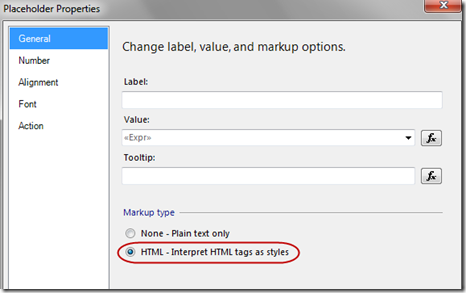
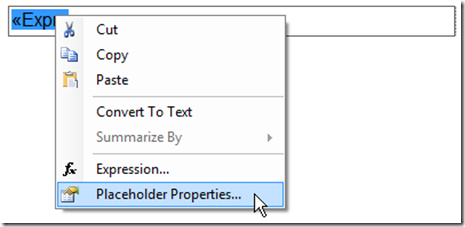
First, you do need to define Placeholder Properties on the Expression:
SplitFormatting_PlaceholderPropertiesForExpr
Within the Placeholder Properties, change the default Markup type to be “HTML – Interpret HTML tags as styles.”  If you forget to change this radio button, then the html tags will be rendered as literal text.
SplitFormatting_PlaceholderPropertiesHTMLRadioBtn
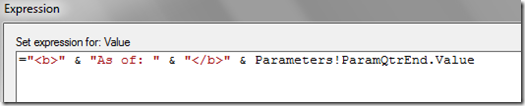
Then within your expression, insert the HTML tags as needed.
SplitFormatting_HTMLInExpression
Only a subset of HTML tags are supported within SSRS, such as bold, italics, and underline.  The MSDN page on Formatting Text and Importing HTML specifies the valid HTML tags you may use within an SSRS textbox.  If you use an HTML tag that isn’t supported in SSRS, it will be ignored.
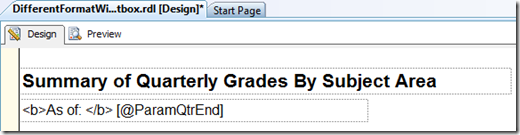
As a sidenote, using HTML tags within a simple expression will work as well:
SplitFormatting_HTMLInPlaceholder
However, in a real situation, I would reserve using HTML tags to situations when I have a complex expression.  With a simple expression, I’d opt to keep the formatting options simpler.

Passing Multi-Value Parameters In Reporting Services

Here is a quick and efficient way to pass and use multi value parameters in SSRS and your stored procedures or SQL.

Concept

  •  Convert the parameter array to CSV
    •  In the SSRS report, on the parameters tab of the query definition, set the parameter value to:
    • =join(Parameters!YourParamName.Value,",")
  • Create a Table Valued function to convert the CSV string to a table that can be addressed as per normal (See function below - there are many variation on the web)
  • Join or or use this function as per a normal sub SELECT statement (See example sp below

You can also use a simple text box to pass a  comma separated string to SQL server directly. The user simply enters a comma separated list of values. This is useful where the user may need to select multiple values from a list that is too large to be displayed as a multi select drop-down (ie a company might have many thousands of customers which is too many to display in a drop down - but entering half a dozen client codes directly into a text box is a viable solution)

Gerard

User defined function for numeric strings

SET ANSI_NULLS ON
GO
SET QUOTED_IDENTIFIER ON
GO
/*
======================================================================================================================================
Author:            Gerard
Create date:   
Description:    Returns a recordset from SSRS multi select parameter that has been passed into a stored procedure
                (turns a comma seperated string into a records set)
Requirements:    Paramater variable must be formed up into a comma deliminated string (or some other delimiter if the data
                already contains commas)
                Parameters can be passed in directly from SSRS often but some data types need to be massaged in SSRS
                    This is achieved in the SSRS dataset that is calling the sp by using the VB JOIN function
                        DS calling SP -> Properties -> Parameters
                        Add Parameter that is multi select -> add JOIN script to concat selected values with commas (or other char if data contains commas)
                        EG Param=-ResponsiblePartner   Expr=JOIN(Parameters!ResponsiblePartner.Value,",")


                Example of usage in SP
                WHERE EMPLOYEE_CODE IN (SELECT * FROM DelimitedSplit8K(@RespPartners, ','))
                INNER JOIN (SELECT * FROM DelimitedSplit8K(@RespPartners, ',')) AS t ON t.Item = s.CUST_CODE


NOTE:                a useful bit of code to create a comma delimited string from a recordset
                    is below (useful place to leave it)
                    SELECT @RespPartners = COALESCE(@RespPartners + ',','') +  EMPLOYEE_CODE
                    FROM _JWS_Responsible_Partners
               
Modifications:    ALL MODIFICATIONS MUST BE DETAILED BELOW SHOWING DATE

Modified By:    Gerard   
Date:           
Modification:    modified DelimitedSplit8K to return a Integer recordset where multi select field is numeric

======================================================================================================================================


*/
ALTER FUNCTION [dbo].[DelimitedSplit8K_Int]
--===== Define I/O parameters
        (@pString VARCHAR(8000), @pDelimiter CHAR(1))
--WARNING!!! DO NOT USE MAX DATA-TYPES HERE!  IT WILL KILL PERFORMANCE!
RETURNS TABLE WITH SCHEMABINDING AS
 RETURN
--===== "Inline" CTE Driven "Tally Table" produces values from 1 up to 10,000...
     -- enough to cover VARCHAR(8000)
  WITH E1(N) AS (
                 SELECT 1 UNION ALL SELECT 1 UNION ALL SELECT 1 UNION ALL
                 SELECT 1 UNION ALL SELECT 1 UNION ALL SELECT 1 UNION ALL
                 SELECT 1 UNION ALL SELECT 1 UNION ALL SELECT 1 UNION ALL SELECT 1
                ),                          --10E+1 or 10 rows
       E2(N) AS (SELECT 1 FROM E1 a, E1 b), --10E+2 or 100 rows
       E4(N) AS (SELECT 1 FROM E2 a, E2 b), --10E+4 or 10,000 rows max
 cteTally(N) AS (--==== This provides the "base" CTE and limits the number of rows right up front
                     -- for both a performance gain and prevention of accidental "overruns"
                 SELECT TOP (ISNULL(DATALENGTH(@pString),0)) ROW_NUMBER() OVER (ORDER BY (SELECT NULL)) FROM E4
                ),
cteStart(N1) AS (--==== This returns N+1 (starting position of each "element" just once for each delimiter)
                 SELECT 1 UNION ALL
                 SELECT t.N+1 FROM cteTally t WHERE SUBSTRING(@pString,t.N,1) = @pDelimiter
                ),
cteLen(N1,L1) AS(--==== Return start and length (for use in substring)
                 SELECT s.N1,
                        ISNULL(NULLIF(CHARINDEX(@pDelimiter,@pString,s.N1),0)-s.N1,8000)
                   FROM cteStart s
                )
--===== Do the actual split. The ISNULL/NULLIF combo handles the length for the final element when no delimiter is found.
 SELECT ItemNumber = ROW_NUMBER() OVER(ORDER BY l.N1),
        Item       = CAST(SUBSTRING(@pString, l.N1, l.L1) AS INT)
   FROM cteLen l
   WHERE ISNUMERIC(SUBSTRING(@pString, l.N1, l.L1))=1
;

User defined functionfor text strings

SET ANSI_NULLS ON
GO
SET QUOTED_IDENTIFIER ON
GO
/*
======================================================================================================================================
Author:            Unknown
Create date:   
Description:    Returns a recordset from SSRS multi select parameter that has been passed into a stored procedure
                (turns a comma seperated string into a records set)
Requirements:    Paramater variable must be formed up into a comma deliminated string (or some other delimiter if the data
                already contains commas)
                Parameters can be passed in directly from SSRS often but some data types need to be massaged in SSRS
                    This is achieved in the SSRS dataset that is calling the sp by using the VB JOIN function
                        DS calling SP -> Properties -> Parameters
                        Add Parameter that is multi select -> add JOIN script to concat selected values with commas (or other char if data contains commas)
                        EG Param=-ResponsiblePartner   Expr=JOIN(Parameters!ResponsiblePartner.Value,",")


                Example of usage in SP
                WHERE EMPLOYEE_CODE IN (SELECT * FROM DelimitedSplit8K(@RespPartners, ','))
                INNER JOIN (SELECT * FROM DelimitedSplit8K(@RespPartners, ',')) AS t ON t.Item = s.CUST_CODE


NOTE:                a useful bit of code to create a comma delimited string from a recordset
                    is below (useful place to leave it)
                    SELECT @RespPartners = COALESCE(@RespPartners + ',','') +  EMPLOYEE_CODE
                    FROM _JWS_Responsible_Partners
               
Modifications:    ALL MODIFICATIONS MUST BE DETAILED BELOW SHOWING DATE

Modified By:    Gerard       
Date:            28/08/15
Modification:    Space in comma seperated string prevents match ie 'an1, dhp1' returns an1 while 'an1,dhp1' returns an1 and dhp1


Modified By:           
Date:           
Modification:   
======================================================================================================================================


*/
ALTER FUNCTION [dbo].[DelimitedSplit8K]
    (@pString VARCHAR(8000), @pDelimiter CHAR(1))


RETURNS TABLE WITH SCHEMABINDING AS
 RETURN
   --SET @pString =REPLACE(@pString, ' ', '')

--===== "Inline" CTE Driven "Tally Table" produces values from 1 up to 10,000...
     -- enough to cover VARCHAR(8000)
    WITH
        E1(N) AS (
            SELECT 1 UNION ALL SELECT 1 UNION ALL SELECT 1 UNION ALL
            SELECT 1 UNION ALL SELECT 1 UNION ALL SELECT 1 UNION ALL
            SELECT 1 UNION ALL SELECT 1 UNION ALL SELECT 1 UNION ALL SELECT 1
        )--10E+1 or 10 rows
        ,E2(N) AS (SELECT 1 FROM E1 a, E1 b) --10E+2 or 100 rows
        ,E4(N) AS (SELECT 1 FROM E2 a, E2 b) --10E+4 or 10,000 rows max
        ,cteTally(N) AS (--==== This provides the "base" CTE and limits the number of rows right up front
                     -- for both a performance gain and prevention of accidental "overruns"
            SELECT TOP (ISNULL(DATALENGTH(REPLACE(@pString, ' ', '')),0)) ROW_NUMBER() OVER (ORDER BY (SELECT NULL)) FROM E4
        )
        ,cteStart(N1) AS (--==== This returns N+1 (starting position of each "element" just once for each delimiter)
            SELECT 1 UNION ALL
            SELECT t.N+1 FROM cteTally t WHERE SUBSTRING(REPLACE(@pString, ' ', ''),t.N,1) = @pDelimiter
        )
        ,cteLen(N1,L1) AS(--==== Return start and length (for use in substring)
            SELECT s.N1,
            ISNULL(NULLIF(CHARINDEX(@pDelimiter,REPLACE(@pString, ' ', ''),s.N1),0)-s.N1,8000)
            FROM cteStart s
        )
       
        SELECT ItemNumber,Item FROM
        (
            --Do the actual split. The ISNULL/NULLIF combo handles the length for the final element when no delimiter is found.
            SELECT ItemNumber = ROW_NUMBER() OVER(ORDER BY l.N1),
                Item= SUBSTRING(REPLACE(@pString, ' ', ''), l.N1, l.L1)
            FROM cteLen l
        ) as a
        WHERE REPLACE(Item, ' ', '') <> ''
       
;
;


Example sp
SET ANSI_NULLS ON
GO
SET QUOTED_IDENTIFIER ON
GO
/*
======================================================================================================================================
TestOnly
======================================================================================================================================
Example Call
exec udspr_REPORT_Gerard_Test2 '1010,1011,2010,3013,4012'

*/
CREATE PROC [dbo].[sp_Gerard_Test2]
(


    @CSVIn VARCHAR(8000) = NULL
   
)
AS
BEGIN
SELECT * FROM DelimitedSplit8K(@CSVIn, ',') AS wt

/*
Example of use in Inner Join
INNER JOIN (SELECT Item FROM DelimitedSplit8K(@PracticeGroup, ',')) AS wt ON (SomeTable.SomeField = wt.Item)
Example of most common use - IN
WHERE x.x IN((SELECT Item FROM DelimitedSplit8K(@PracticeGroup, ',')
*/

END

Tuesday, June 21, 2011

SQL Server Db stuck in restore state

It is possible to end up with a database stuck in a restoring state either you have specified the restore with no recovery or the client has disconnected whilst the restore is running or you have run out of disk space.

If the situation is that the database has fully restored but has not not recieved the recover command the following tSQL will put it back to an operational state

RESTORE DATABASE WITH RECOVERY

Sunday, May 8, 2011

DLink DNS 323

The DNS 323 is a relatively cheap ~$150 Network Attached Storage device (NAS) that I use at home to store all the important stuff (family photos etc), back and synchronize my work directories on all my computers and to stream movies to our PS3 (unfortunately cannot stream microsoft's TV format - .wtv)

It has a little 200mhz ARM processor running a cut down version in Linux and a web interface to make all setup and changes.

Here is the link to its homepage
http://www.dlink.com/products/?pid=DNS-323
Basic services offered are:
  • NAS disk share
  • AV server for streaming media
  • USB port to attach a network printer (see notes on SharePort utility below- don't even bother trying to use it as a print server as DLink advertises)
  • ftp server
  • iTunes server
  • + a few others
  • + you can install other Linux packages if you are technical
Overall I am very happy with it for the last 4 years. It has gone through a series of drives and a series of RAID configurations as I have filled it up and run out of space. There are few things to both know and be aware of with it though - here is a list of what I am aware of

Disk Size - 2TB now supported
With firmware v1.8 or v1.9 installed it is capable of holding 2 X 2TB disks. Yay. Be careful of the disks you buy though. DLink has tested only Western Digital WD20EADS 2TB drives. There are potential problems with (most) 2TB disks on the market using the newer 4K sectors and AFT technology. Look into it very carefully before you buy a disk. I just went with the DLink recommended WD disks - be careful they are the exact ones though - the WD20EARS 2TB drives do not work (1 character different - beware)

Speed
The 323 is very slow in file transfers to windows machines. A fair bit of this is due to the SAMBA configuration on the 323, a fair bit due to the limited CPU and a fair but due to the windows configurations and network card used. Basically this device is not up to much with its little ARM processor and the SAMBA configuration as set up is very CPU intensive with 64K buffers. In addition file transfers will be slower if the windows machine has a low powered CPU. Still - it streams HD no problems for me.

Use FTP. If you are doing a lot of large file transfers turn on the built in ftp server and use ftp to transfer the files. You will find it will be double the speed. Filezilla is a good ftp client for windows.

SharePort Utility
This DLink utility shares the USB port on the back of the 323 across the network. I use it to share a Lexmark 3200 series printer. The concept is great - apparently if you attach a powered USB hub you can share multiple devices.

I couldn't get SharePort working but eventually struck on the magic combination. I had initially installed v1.17 addon and on the 323 and was using 1.17 windows utility software on my PC. It could not see any in USB device inserted into the 323

The magic combination (for me) was SharePort v1.17 addon on the 323 and SharePort v3.0 windows utility software on my PC.

I will update this post if I find anything else to be aware of about this great little box. Feel free to add comments if you know of any other "gotchya's"

Sunday, January 2, 2011

Listing MySQL functions and Procedures

Maintaining and updating stored procedures and functions in MySQL often will require root access which in practice means that you might need to have some interaction with your hosting provider if you wish to use them.

Operating the the standard phpMyAdmin interface gives no support for them other then the ability to create them through script.

The following bits of SQL are useful for viewing stored procedures and functions in a hosted database accessed through phpMyAdmin

SELECT ROUTINE_NAME
FROM INFORMATION_SCHEMA.ROUTINES
WHERE ROUTINE_TYPE="FUNCTION"
AND ROUTINE_SCHEMA="database"

SELECT ROUTINE_NAME
FROM INFORMATION_SCHEMA.ROUTINES
WHERE ROUTINE_TYPE="PROCEDURE"
AND ROUTINE_SCHEMA="database"


Also the "SHOW PROCEDURE STATUS" will give details of stored procedures and functions

Dealing with MySQL Function

Newer Versions of MySQL have the binary log which will generate te following error

This function has none of DETERMINISTIC, NO SQL, or READS SQL DATA in its declaration and binary logging is enabled (you *might* want to use the less safe log_bin_trust_function_creators variable)

To fix this you need incude the following keywords
  • CONTAINS SQL indicates that the routine does not contain statements that read or write data. This is the default if none of these characteristics is given explicitly. Examples of such statements are SET @x = 1 or DO RELEASE_LOCK('abc'), which execute but neither read nor write data.

  • NO SQL indicates that the routine contains no SQL statements.

  • READS SQL DATA indicates that the routine contains statements that read data (for example, SELECT), but not statements that write data.

  • MODIFIES SQL DATA indicates that the routine contains statements that may write data (for example, INSERT or DELETE).

Ther referenced artical indicates using
SET GLOBAL log_bin_trust_function_creators = 1;

References
http://mvnrepository.blogspot.com/2009/08/this-function-has-none-of-deterministic.html


Example
DELIMITER $$

DROP FUNCTION IF EXISTS `adadmin_adem`.`fDeleteTheme` $$
CREATE DEFINER=`root`@`localhost` FUNCTION `fDeleteTheme`(id_in INTEGER) RETURNS int(11)
DETERMINISTIC
READS SQL DATA
MODIFIES SQL DATA
BEGIN


DECLARE counter INTEGER;
DECLARE parent_id INTEGER;


SELECT count(id_theme) FROM s_themes where parent = id_in INTO counter;


IF counter = 0 THEN

SELECT parent FROM s_themes where id_theme = id_in INTO parent_id;
DELETE FROM adem.s_themes WHERE id_theme = id_in;
END IF;

RETURN parent_id;

END $$

DELIMITER ;

Tuesday, April 6, 2010

DLink 323 NAS box under Windows 7 or Vista

My D Link 323 NAS box worked perfectly under xp but with a dual upgrade to a Billton 7300 router and Windows 7 I have had continual problems.

After applying all the latest firmware to both devices I got it sorted

The final niggle was the 323 could be set up with mapped drives but I was randomly loosing my mapped drives when I shut it down. I could ping the NAS box and read the administration page and see the media server but could not access the file system via my mapped drives or device name ie \\NAS\Volume_1\

The solution turned out to be to use the ip address rather then the divice name in all mapping or accessing the device directly ie \\192.168.0.5\Volume_1\

This has been such a pain in the bottom I thought I would past it here - if someone is searching for the same problem they might pick it up.

Sunday, July 5, 2009

Return File name from path

Always handy - never there when you need it. A simple recursive function to return the file name from the full path


Private Function GetFilenameFromPath(ByVal strPath As String) As String
' Returns the rightmost characters of a string upto but not including the rightmost '\'
' e.g. 'c:\winnt\win.ini' returns 'win.ini'

If Right$(strPath, 1) <> "\" And Len(strPath) > 0 Then
GetFilenameFromPath = GetFilenameFromPath(Left$(strPath, Len(strPath) - 1)) + Right$(strPath, 1)
End If
End Function